Self-directed project
2022
VocHub
A vocabulary learning application, designed end to end as a study in habit and retention.
- Role
- UX Researcher, Information Architect, Usability Test Moderator, Visual Designer
- Timeline
- End-to-end · 2022
- Disciplines
- UX Research, Product Design, Interaction Design
- Tools
- InVision, Mural, Figma, Miro, Draw.io, Pen & paper
At a glance
- The problem
- Limited time to learn with an instructor, no practice partners to give feedback, and communication barriers while travelling; existing vocabulary apps did not address these together, for a persona built from interview data ("Richy").
- My role
- Market and competitor research, a survey and interviews, personas and task flows, wireframes and usability testing, then final UI and visual design.
- What I did
- SWOT analysis of Duolingo, Babbel and Tandem; a 55-respondent survey; four qualitative attitudinal interviews analysed with the Thinking-Feeling-Doing method; a persona and problem statement; task flows for adding study friends; low- and mid-fidelity wireframes tested with five participants (Jakob Nielsen's error severity scale, moderated remotely on Zoom and Microsoft Teams); a splash-screen preference test ahead of final UI.
- What changed
- Usability testing surfaced concrete fixes (clearer sign-up and login entry points, a voice-practice feature for pronunciation, simpler onboarding), and the preference test set the final splash-screen direction. Further usability and A/B testing was the declared next step.
How to read this case study
Research writing gets less useful the more it blurs what was found with what was guessed. Every claim below is labelled with how much weight it can carry.
- Observed
- Came directly from data I collected. A source is always named.
- Interpreted
- My reading of that data. Reasonable, and still mine rather than the participants'.
- Hypothesis
- A proposition I have not yet tested. Written down so it can be proved wrong.
- Unvalidated concept
- A design idea. There is no evidence yet that it works.
What the testing changed
Five participants on the wireframes, before the final UI rather than after it.
VocHub is a vocabulary-learning app I designed end to end to practise the fundamentals: research, definition, wireframes, testing, UI. The usability round surfaced three concrete fixes, clearer sign-up and login entry points, a voice feature for pronunciation practice, and simpler onboarding, and a preference test set the final splash-screen direction.
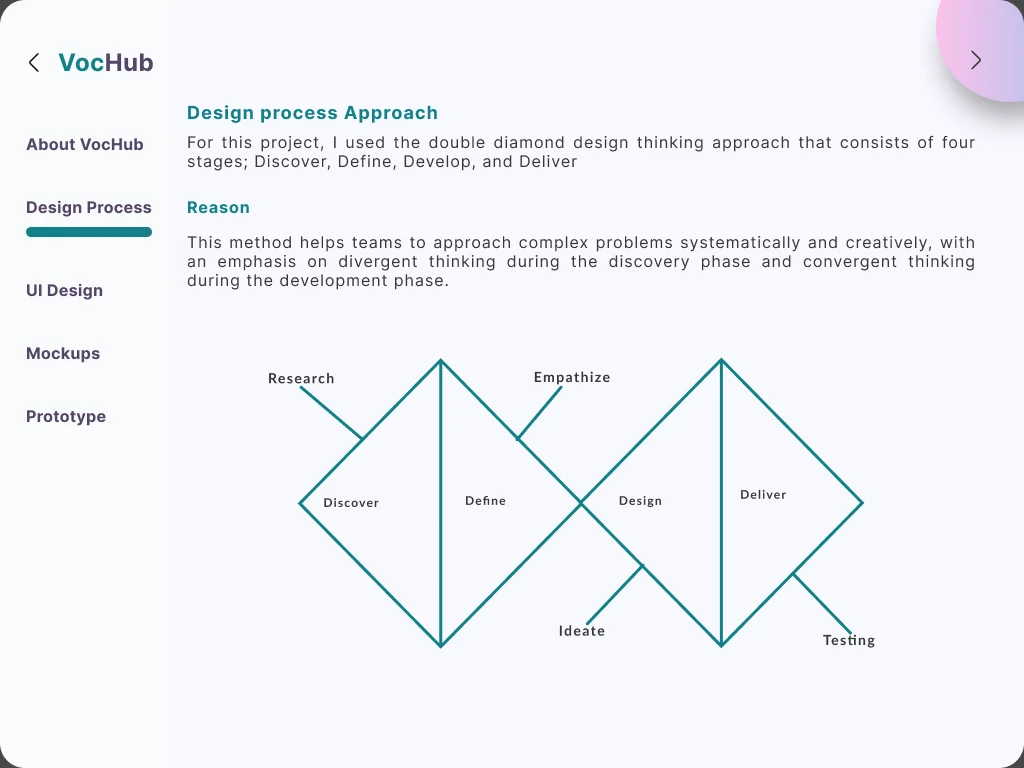
Discover
Competitor research first, then a survey and interviews to find where existing apps fall short.
I researched vocabulary and language-learning apps against the features language learners actually want, drawing on my own experience learning German and weighing cost against effectiveness. I ran a SWOT analysis on three apps (Duolingo, Babbel and Tandem), and each pointed to a different gap: Duolingo needed difficulty that adapted to the learner's progress, Babbel needed real conversation practice at the intermediate and advanced levels, and Tandem needed tutors and proficiency-based partner matching.
- Survey respondents
- 55Survey respondents
- Attitudinal interviews
- 4Attitudinal interviews
- Usability test participants
- 5Usability test participants
SourceOnline survey and qualitative interviews conducted for the VocHub project, published on udezimena.work.
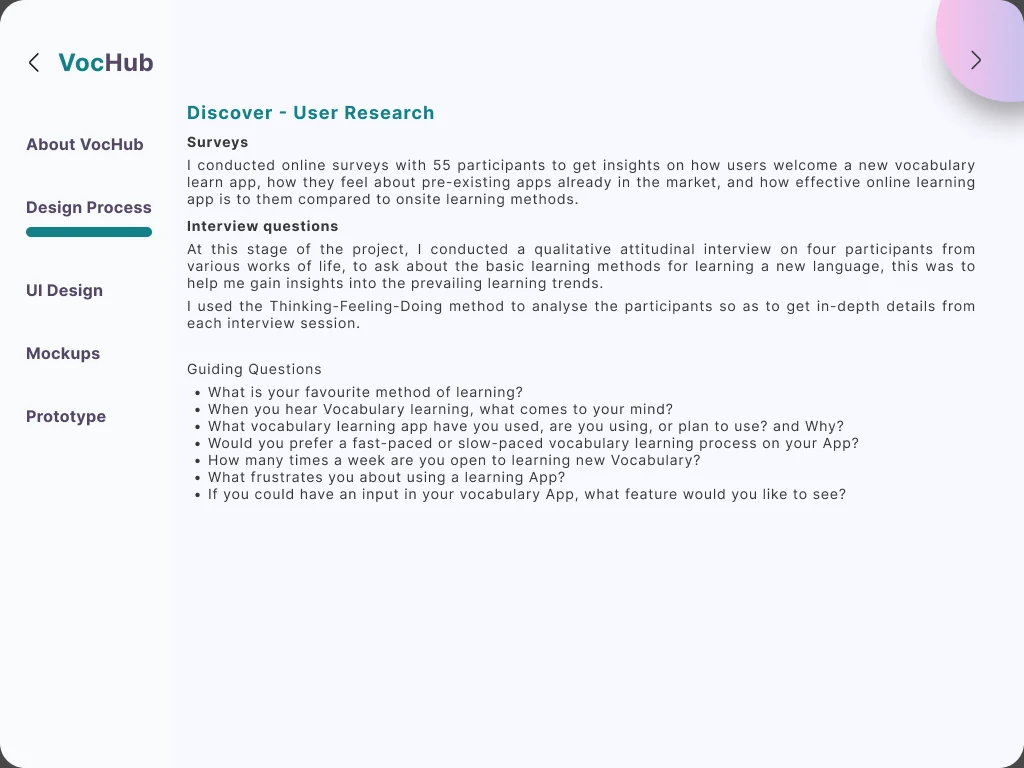
The survey gathered 55 respondents' perceptions of a new vocabulary app, their experience with existing apps, and how online learning compared with onsite methods for them. I followed it with four qualitative attitudinal interviews across different backgrounds, analysed with the Thinking-Feeling-Doing method to get at what people actually thought, felt and did around learning a language, not just what they said they wanted.
Define
The interviews and survey converged on a persona, Richy: someone with no time for instructor-led learning, no practice partner to correct her, and real communication barriers when travelling. The problem statement that came out of it (a need for a time-efficient, interactive learning experience with partners, and confident communication while travelling) set the direction for everything that followed.
What the goals and challenges pointed to
- Develop fluency to communicate effectively, and make friends through language proficiency.
- Practise real-life conversation, and stay motivated through in-app incentives.
- Limited time for instructor-led learning, and no practice partners to give feedback.
- Communication barriers when travelling to new cities.
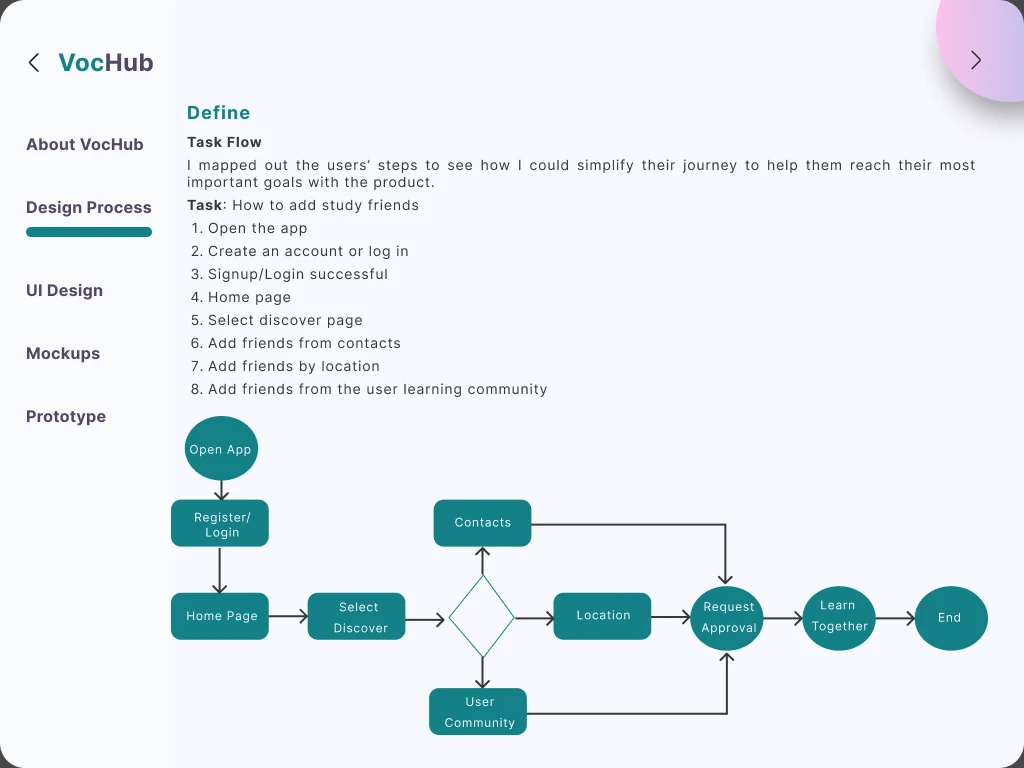
I mapped a task flow for the feature that mattered most to the persona (adding study friends) from opening the app through language and level selection to finding people by contact, location or the learning community.
Develop
Low-fidelity wireframes, five-participant usability testing, then final UI.
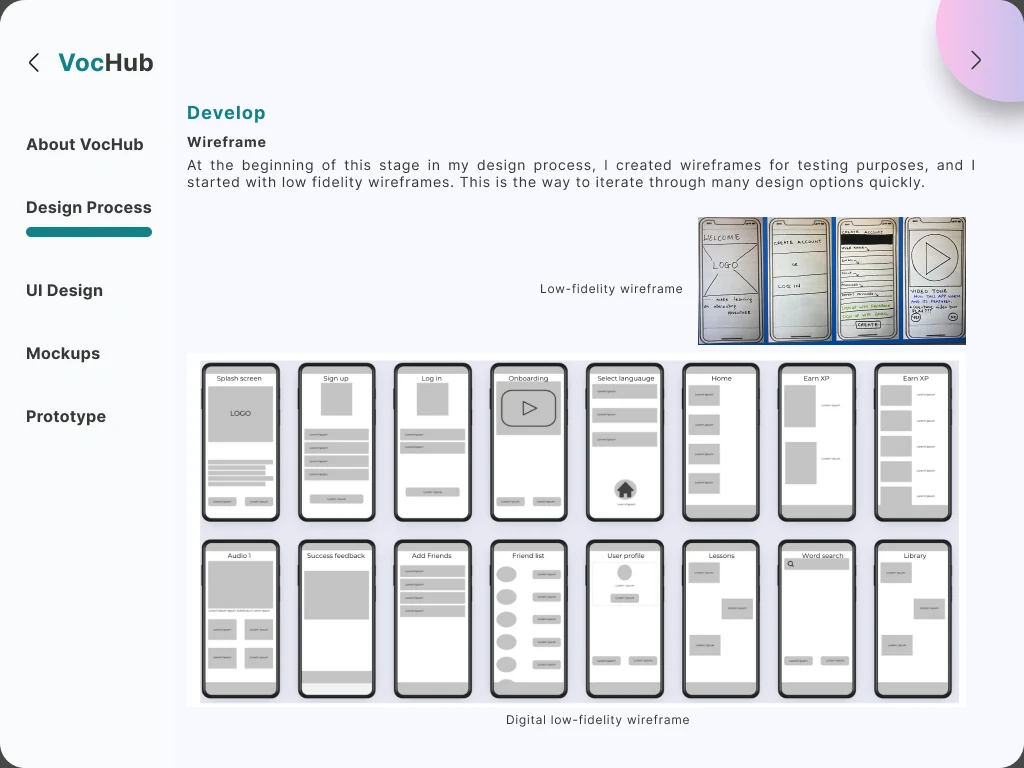
I built low-fidelity wireframes first, then a digital low-fidelity pass with grids and columns for consistency, and mid-fidelity wireframes that converged on typography, icons and layout while still deliberately withholding colour: the point was to test structure and hierarchy, not finish.
Five participants each completed four tasks (signing up, viewing the word of the day and a saved-words dictionary, earning experience points, and adding friends) in sessions of 5 to 10 minutes, moderated remotely on Zoom and Microsoft Teams, scored against Jakob Nielsen's error severity rating scale.
What testing recommended
- Clearer sign-up and login entry points on their own pages.
- A voice-practice feature to help with pronunciation of new words.
- Slides explaining how the app works, instead of a video tour.
- Pop-up reminders explaining each feature on first use.
- Keeping the app as simple as possible throughout.
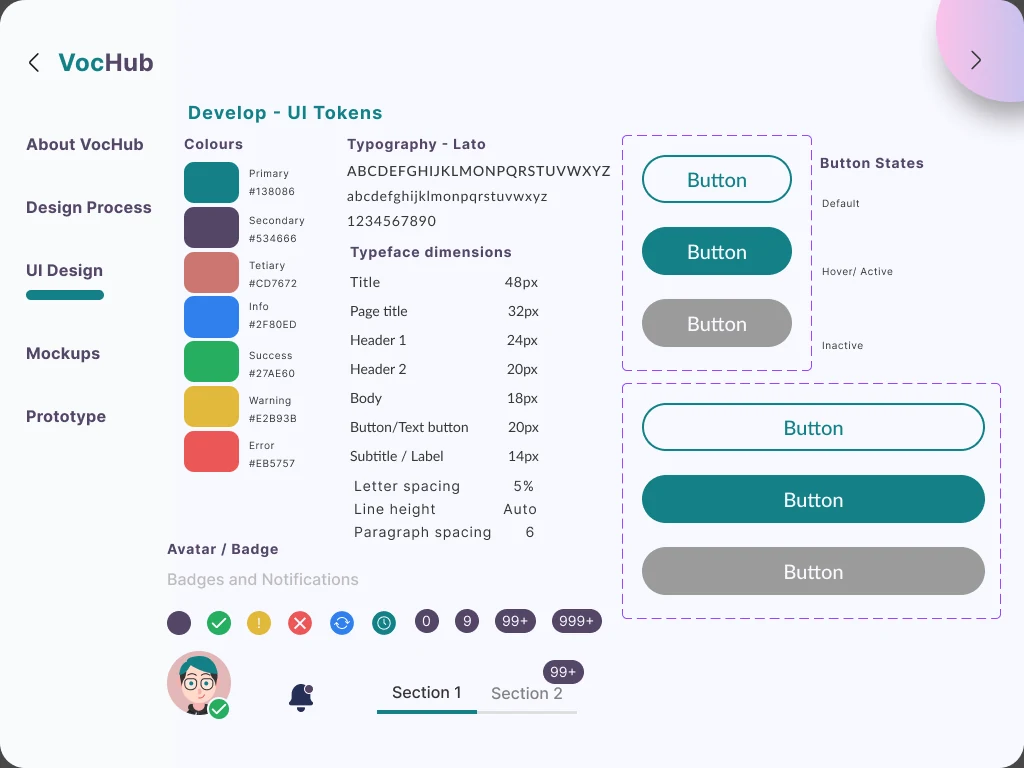
After testing, I built the final screens in Figma, starting with a style guide and a small design system: colour, icons, illustration, avatar imagery, typography, grid and buttons. A preference test on the splash screen found the original layout unbalanced; I revised the logo mark, background and typography until it read as more cohesive.
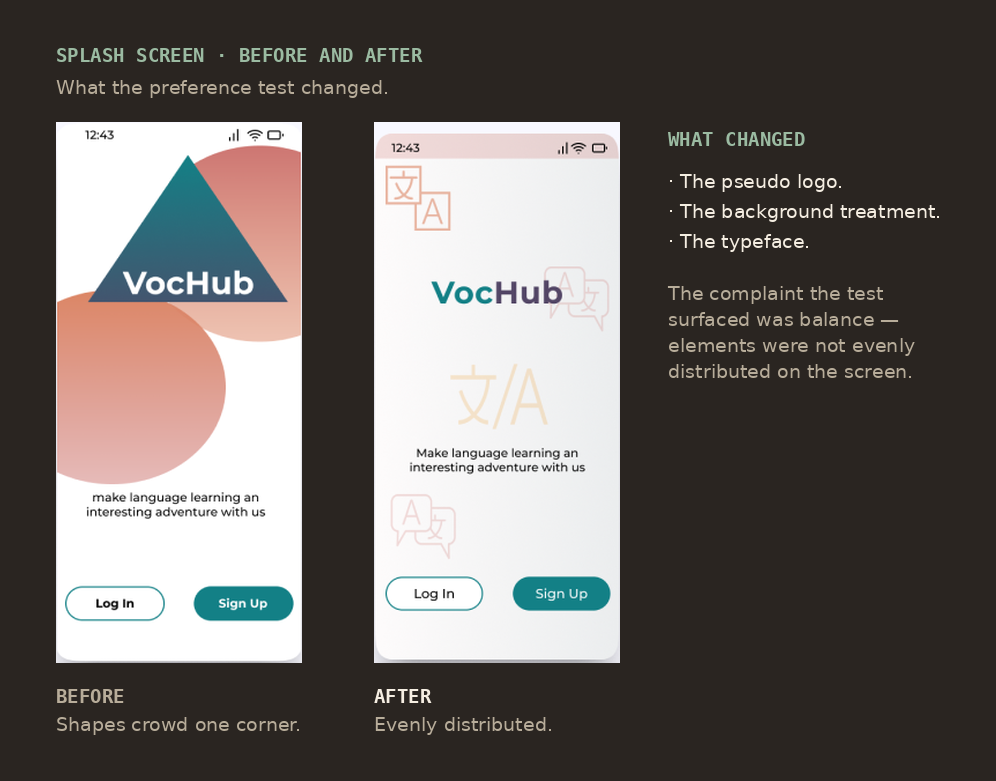
The first version stacks a large triangle and circle in one corner, leaving the rest of the screen empty. The revision replaces the pseudo logo, lightens the background and changes the typeface, so the elements sit evenly across the screen. The complaint the test surfaced was balance, not taste.
The design system underneath it was the part I would defend hardest. For a first end-to-end project the temptation is to design screens; what made the screens consistent was deciding the smaller things once, what a form field looks like in each state, what a tooltip is for as against a pop-up, and a spacing scale to place them on.
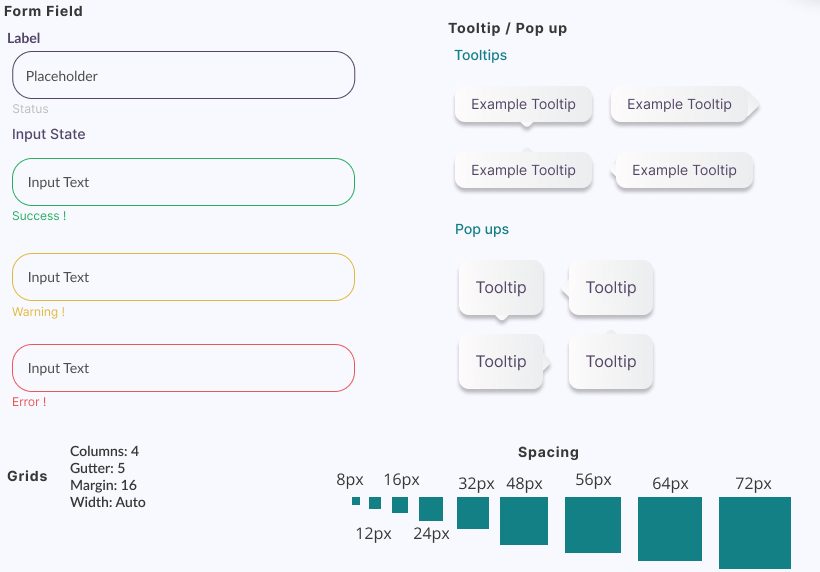
A form field in four states, each carrying a text label (Success, Warning, Error), rather than relying on its border colour alone. Tooltips and pop-ups are separated as distinct components with their own variants. The grid is four columns with a 16-pixel margin, and the spacing scale runs 8, 12, 16, 24, 32, 48, 56, 64, 72.
Interpreted
Giving each form-field state a word as well as a colour was the one accessibility decision I made without being told to, and it is the one I would carry into every project since.
Deliver
A token sheet rather than a set of finished screens.
Interpreted
Specifying hover and inactive states alongside the default is the part that makes a token sheet useful rather than decorative. A palette tells you what the product looks like; a state tells you what it does.
What I took from it
- Simple is almost always the better answer.
- Design for the user, not for the designer, designing for the ideal user helped the process converge faster.
- Put ideas on paper early, and take design critique from more experienced designers seriously, it limits errors before they compound.
- Stay open to unlearning: design habits and trends change, and holding onto either too tightly gets in the way of the next project.