In-house, sole designer
2025
SpellCarver
A CI/CD automation product where the marketing promise and the product interface had to be designed as one continuous journey.
- Role
- UI/UX Designer
- Timeline
- Jun to Aug 2025 · Remote, US
- Disciplines
- UX Research, Product Design, Interaction Design, Design Systems
- Tools
At a glance
- The problem
- SpellCarver had to persuade a developer on a marketing page and then orient them inside a technical product, and the two surfaces were being designed as if they were unrelated.
- My role
- Sole designer on the team, and the product's first dedicated design resource: end-to-end UX and UI across the public site and the product interface.
- What I did
- Worked alongside the in-house developers who use the tool, through three design iterations and usability testing with them. Grouped navigation around what a developer is trying to do, gave pipeline state a reading order, and made security a named destination.
- What changed
- Implemented by the end of my time there, with the product's first UI patterns and components established for the engineers to build against. No accessibility audit, and no outcome metrics were measured.
How to read this case study
Research writing gets less useful the more it blurs what was found with what was guessed. Every claim below is labelled with how much weight it can carry.
- Observed
- Came directly from data I collected. A source is always named.
- Interpreted
- My reading of that data. Reasonable, and still mine rather than the participants'.
- Hypothesis
- A proposition I have not yet tested. Written down so it can be proved wrong.
- Unvalidated concept
- A design idea. There is no evidence yet that it works.
What shipped
Implemented before I left, as the product's first UI patterns and components.
SpellCarver is a secure-automation product: it runs CI/CD pipelines and keeps the security picture visible while it does. I was its only designer for three months, across the public site and the product interface.
The work went into the build rather than into a handover deck, and it did so because the developers who built it had already seen the design three times. What came out of it: a coherent screen set across the site and the product, a documented navigation structure, a consistent hierarchy for metrics and status, and the first UI patterns and components the product had.
Three decisions that shaped it
Interpreted
Group navigation by intent, not by feature. Navigation was the only friction that showed up in all three journeys I mapped, which made it the first decision rather than a later refinement.
Interpreted
Make the product speak at the moments it was going quiet. The mapping kept surfacing the same gap: after a failure, after an adjustment, after a vulnerability is resolved. Status in words, log output on the run itself and explicit confirmation all answer that.
Interpreted
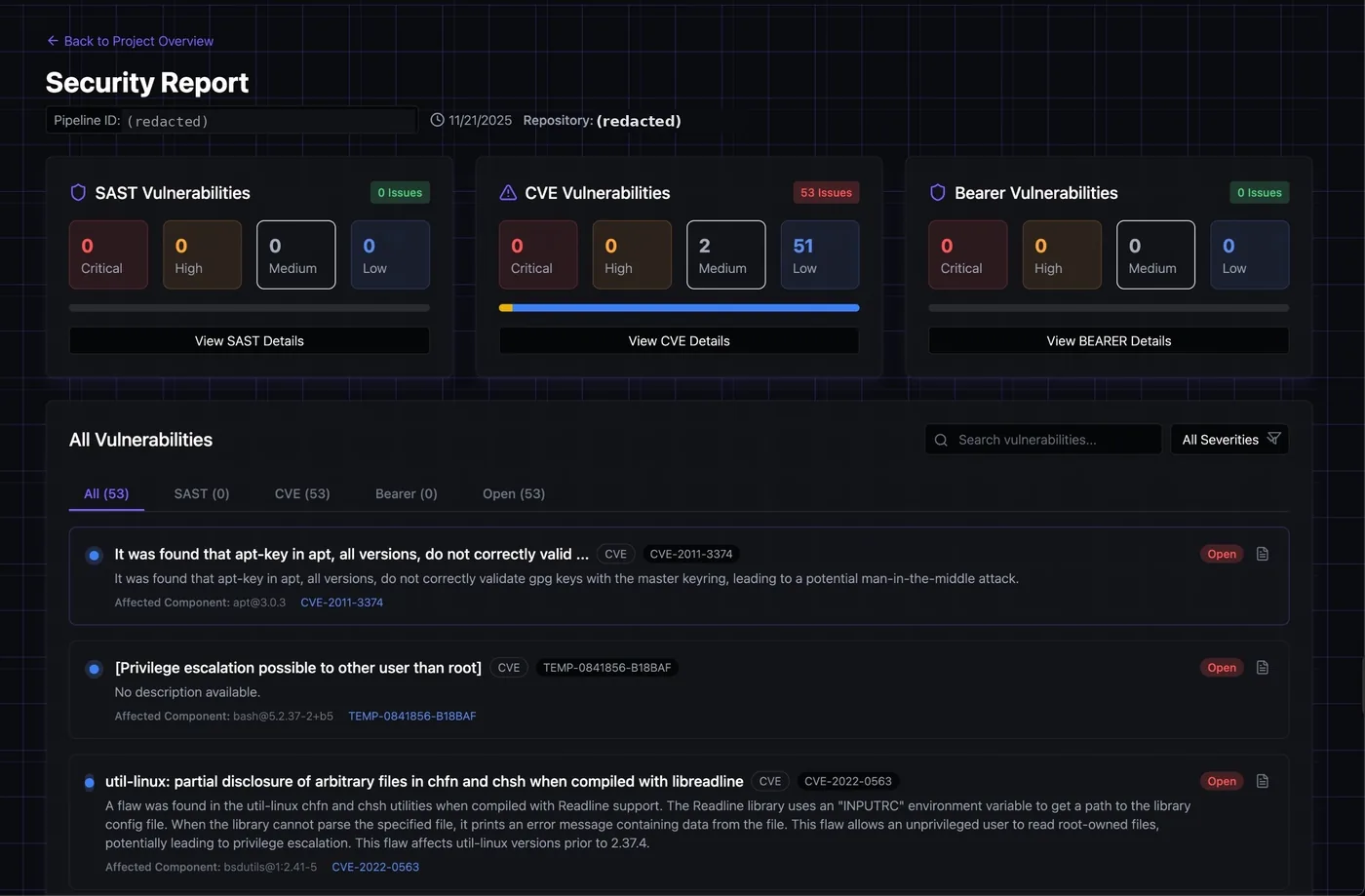
Give security a destination. A product positioned around secure automation should not ask anyone to hunt for the security picture, so it became a named top-level area with a predictable location.
Discover
The users sat in the same building, so I worked with them rather than inferred them.
Observed
The design went through three iterations rather than one pass, with usability testing run with the in-house developers who use the tool.
SourceMy own record of the engagement, Jun to Aug 2025
Observed
The people tested were the product's actual users, the Merlin Mines developers whose daily workflow the tool supports, not proxies recruited to stand in for them.
SourceMy own record of the engagement, Jun to Aug 2025
Interpreted
Having the users in the building changed what the iterations were for. Each round was less about whether a layout was attractive and more about whether a developer could predict where something lived, which is a question you can only settle by watching someone look for it.
One thing shaped more than it looks like it should: Merlin Mines has a warm brand, and the instinct is to carry that voice everywhere. I kept it on the marketing surface and out of status labels, where a developer is making an operational decision and needs the literal word.
Define
Three journeys, with the friction in each one ranked rather than listed.
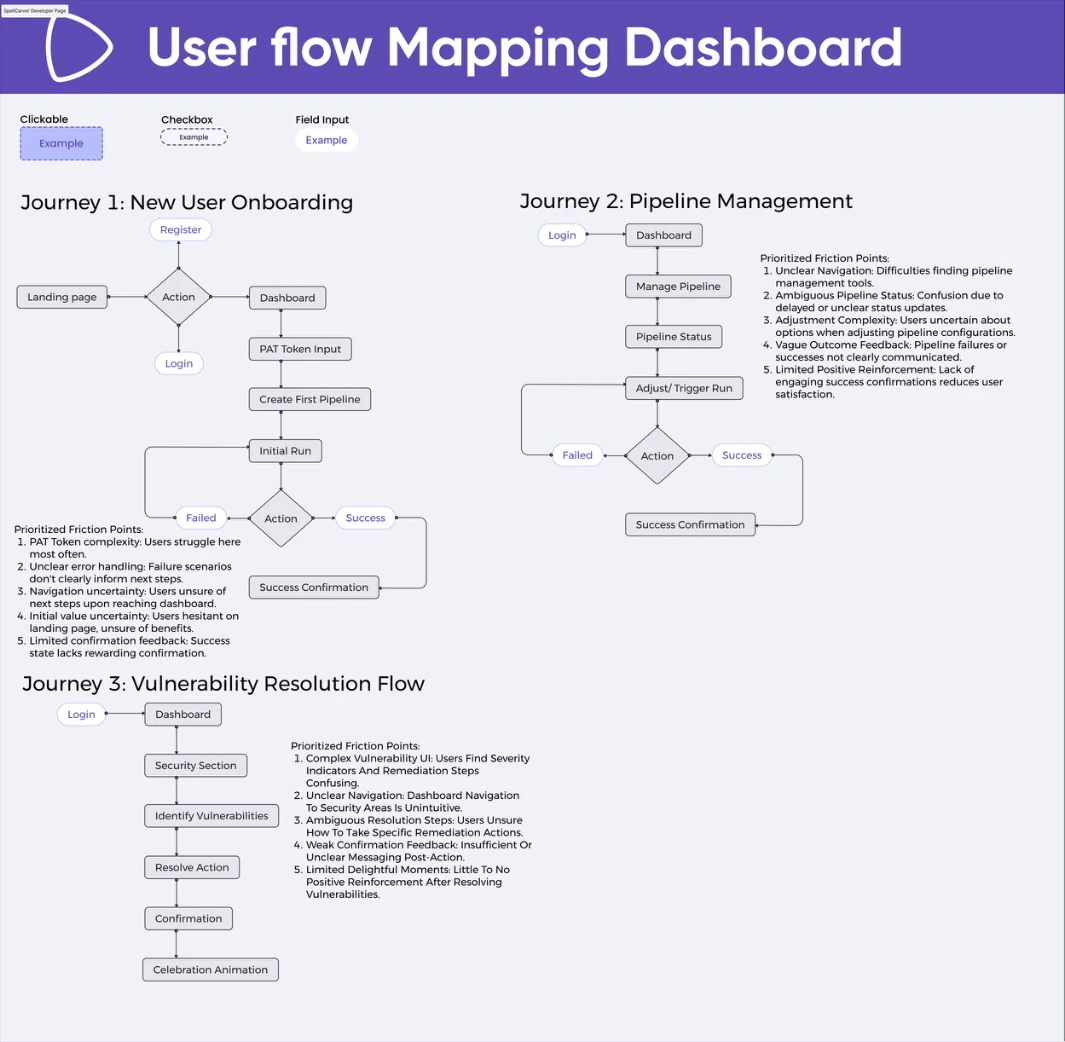
Onboarding runs from landing page to a first pipeline run, and its friction is led by access-token complexity, then unclear error handling, then not knowing where to go on arrival. Pipeline management runs from the dashboard to adjusting or triggering a run, and its friction is led by difficulty finding the pipeline tools, then ambiguous status, then uncertainty about the options when adjusting. Vulnerability resolution runs from the dashboard through the security section to a confirmed fix, and its friction is led by confusing severity indicators and remediation steps, then unintuitive navigation to security, then ambiguity about which remediation to take. All three end on weak or missing confirmation.
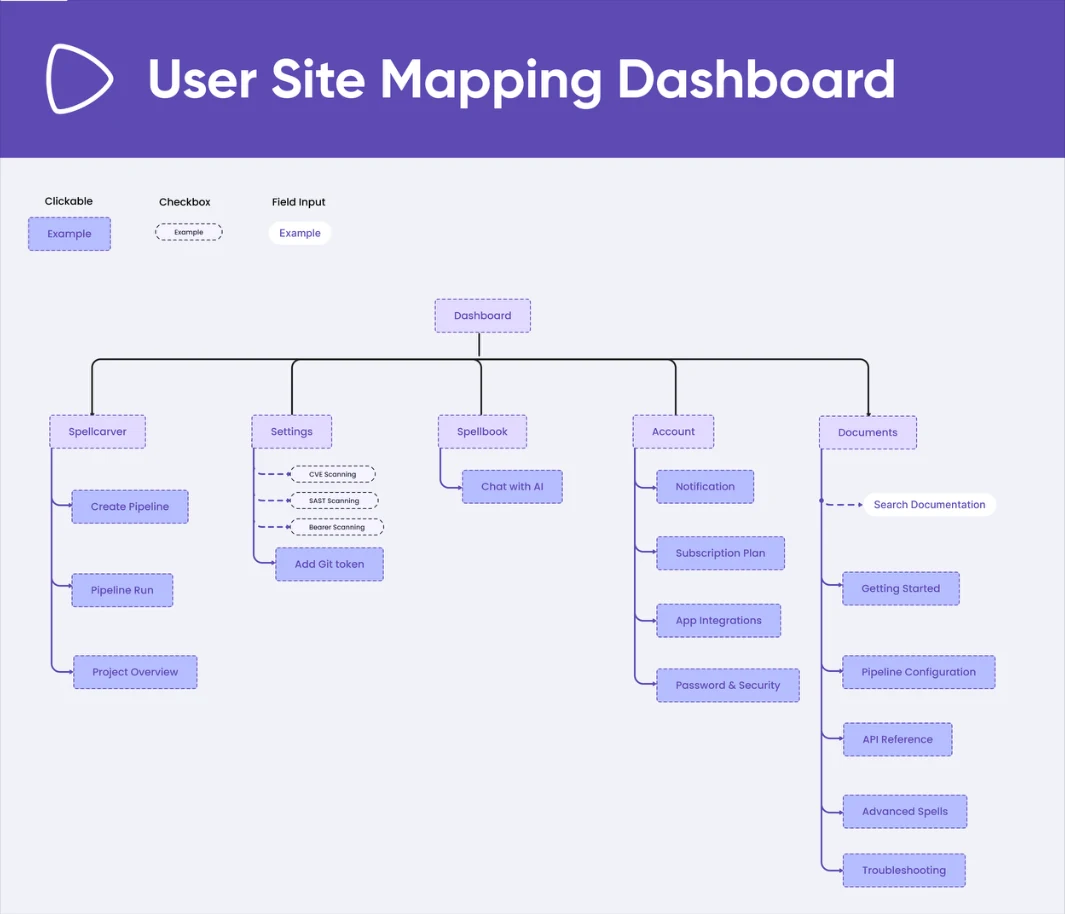
Two ways to organise the same destinations
| Flat feature list | Grouped by intent |
|---|---|
| Mirrors how the product is built internally | Mirrors why someone opened it |
| Every label has to be read to be placed | The group narrows the search before the label is read |
| New features append to the end | New features have an obvious home, or reveal a missing group |
| Security sits among the utilities | Security is a named area of its own |
Develop
Where those decisions met a screen.
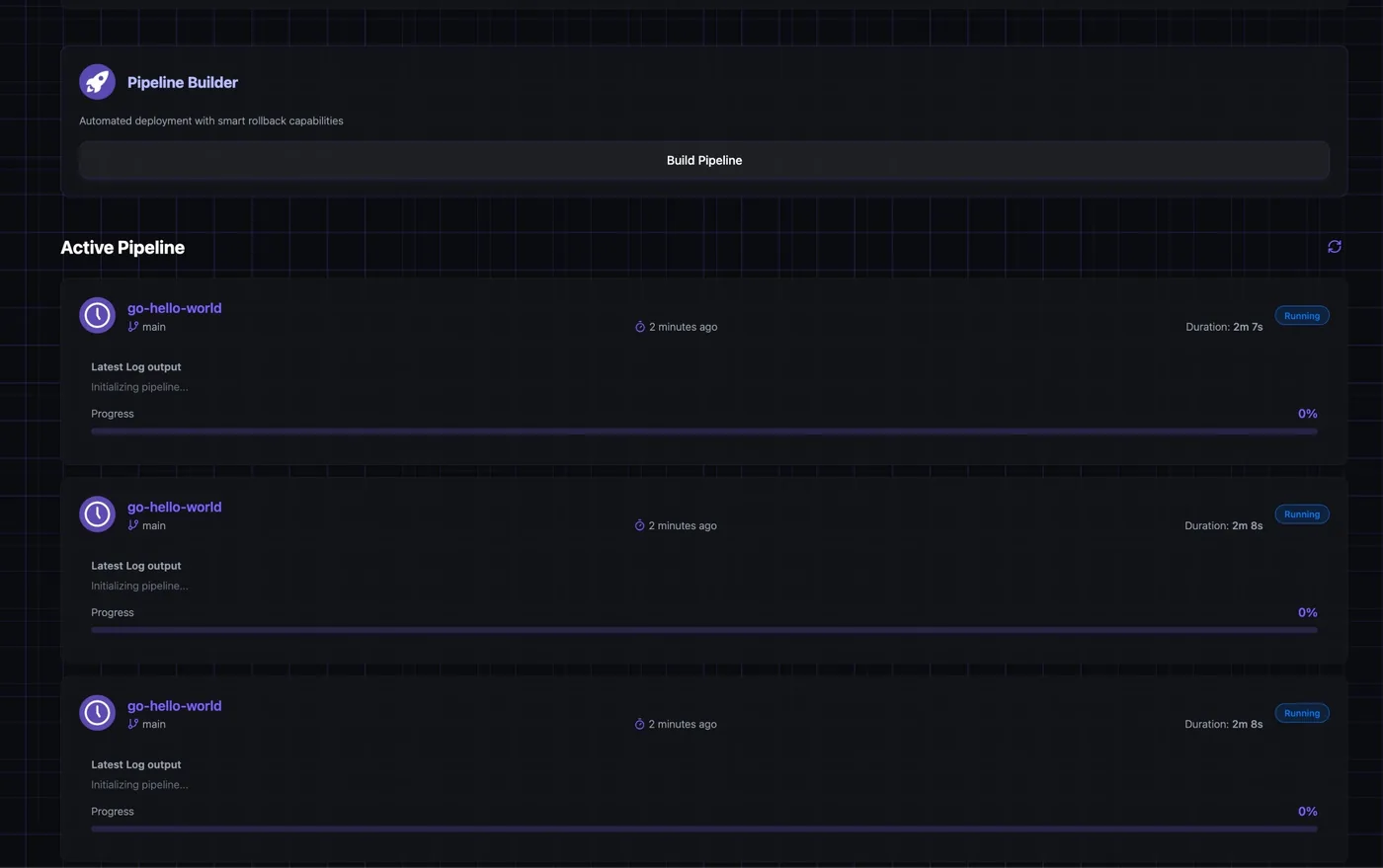
A dashboard of equally weighted numbers is one nobody reads twice. I separated summary values from live pipeline activity and gave them a sequence: what to notice first, what to scan second, where to go for detail.
Interpreted
The public page and the first product screen were being drafted as separate artefacts with separate vocabularies. Designing them against shared terminology makes the path from a call to action to a first real task a continuation rather than a translation.
Deliver
Into the build, not into a deck.
The screen set went to the engineers as patterns and components rather than as finished pictures, which is the part that outlasts any individual screen. A product that has never had a designer does not need one good layout; it needs the vocabulary to make the next twenty consistent.
What stayed untested
Hypothesis
That grouping destinations by intent lets a developer predict where a task belongs without reading the full navigation. Watching someone hesitate before a correct click is how you tell, and that is what the iterations were for.
Hypothesis
That restricting an action to the state where it is genuinely an exception keeps it legible as an escape hatch rather than a way to dismiss a reminder.
Unvalidated concept
Making security easy to find is an interface decision. It does not make the product secure, and nothing here should be read as a compliance claim.
What I still cannot publish is what each testing round surfaced and what changed between the three iterations. Without that, "tested" cannot become "validated" for any single decision above.
Scope, ethics and limits
What this is
- An interface design project: information architecture, content hierarchy and UI patterns for a developer-facing automation product.
- Designed with its users in the building (the in-house developers who run the tool) across three iterations and usability testing with them.
- A record of design decisions and the reasoning behind each one.
What this is not
- Not a published-interface case study. The screens are NDA-protected and none appear here.
- Not a security or compliance claim. The product is positioned around secure automation; nothing here certifies that it is secure or compliant.
- Not a performance report. The figures on the dashboard screens are interface content (sample values demonstrating a layout), and nothing was measured after release.
What is still unvalidated
- The specific design arguments below. Testing happened, but what it found is not reproduced on this page, so no individual decision here should be read as validated by it.
- The marketing-site half of the journey. The testing was with the developers who use the product, not with visitors arriving at the public page.
- Accessibility. The checklist was a standard to design against; no audit was run.
- Anything after release. The work was implemented, and no measurement of how it performed was taken.