Graduate team project
2024
PrototypeHearEase
Smart glasses that transcribe speech in real time and adapt to accents, for people who are hard of hearing.
- Role
- User Researcher, UX Designer, Interaction Designer, Visual Designer
- Timeline
- Autumn 2024 · University of North Texas
- Disciplines
- UX Research, Product Design, Interaction Design
- Tools
- Figma, UsabilityHub
At a glance
- The problem
- People who are hard of hearing lose conversation in noisy, fast, multi-accent settings, and existing captioning assumes one speaker, a quiet room and a familiar accent.
- My role
- One of three designers on the team. I worked across all four of the roles we shared: user research, UX, interaction design and visual design.
- What I did
- User observations, user interviews and expert interviews; a persona and storyboard; information architecture and low-fidelity flows; a high-fidelity prototype; then usability testing, and a second round on the revised design.
- What changed
- Testing located the failure precisely (setup and calibration, not the conversation features), and the flow was rebuilt around that. The product was never engineered, so nothing is claimed about whether the transcription itself would work.
How to read this case study
Research writing gets less useful the more it blurs what was found with what was guessed. Every claim below is labelled with how much weight it can carry.
- Observed
- Came directly from data I collected. A source is always named.
- Interpreted
- My reading of that data. Reasonable, and still mine rather than the participants'.
- Hypothesis
- A proposition I have not yet tested. Written down so it can be proved wrong.
- Unvalidated concept
- A design idea. There is no evidence yet that it works.
What the testing changed
The conversation features held up. The setup ritual in front of them did not, and that is what we rebuilt.
HearEase is a pair of smart glasses that transcribes speech in real time, adapts to different accents, and lets the wearer isolate background noise by how much they choose, with a companion app for setup, environment and saved transcripts.
Usability testing rated signing up and navigating at 4.4 out of 5 for confusion, against 1.4 at the best elsewhere, and located the failure precisely: the calibration page, around naming and renaming. We rebuilt the setup flow around that finding rather than around the part we had found most interesting.
Three things that drove it
Interpreted
The problem is speed, not volume. Missing a word is recoverable; missing the thread of an argument is not. That reframed the product from amplification towards keeping up, and it is why the hard case is a fast multi-accent meeting rather than a quiet room.
Interpreted
Put the limit next to the ask. A product worn on the face, holding a microphone, a camera and location, has to say what happens to the data in the sentence that requests it, not behind a policy link.
Interpreted
The front door carries the product. We spent our attention on the conversation experience because it was the interesting part; testing said that was broadly fine and the unglamorous setup was where people struggled.
What we found before designing
Observations, interviews with hard-of-hearing people, and interviews with experts.
The expert strand mattered more than expected: people who work with hard-of-hearing clients could tell us which problems were common and which were particular to the person describing them.
Observed
Four participants took part in the interviewing process.
SourceProject record, HearEase user interviews, autumn 2024
The persona we worked from, Emma, is a composite: someone hard of hearing who works in an office, struggles with colleagues' accents in meetings, and loses points in fast discussion. We storyboarded her six panels from problem to outcome, a modest artefact that did one specific job, it kept the team arguing about the meeting rather than about the glasses.
Where it broke
We tested two task flows, signing up and navigating the home screen, then starting a conversation. The results split cleanly, and not where we expected.
The two tasks, as rated
| Task 1 (sign up and navigate | Task 2) start a conversation |
|---|---|
| Ease rated 2 out of 5 by one participant, with another reporting difficulty navigating | Ease rated 3 out of 5 by one participant and 4 to 5 out of 5 by another |
| Confusion reported at 4.4 out of 5 | Confusion ranged from 1.4 to 3.3 out of 5 |
| A notable error on the calibration page, around naming and renaming | Back-button problems, spacing between steps, and a second step described as particularly confusing |
Observed
Multiple participants reported problems with the calibration page, and the notable error of the session occurred there, around naming and renaming.
SourceHearEase usability testing, autumn 2024
Observed
Participants rated page navigation generally acceptable, found the task flows properly ordered, and found the calls to action comprehensible.
SourceHearEase usability testing, autumn 2024
Interpreted
Calibration is the step a team treats as plumbing and a user experiences as the moment they find out whether this thing is going to work for them.
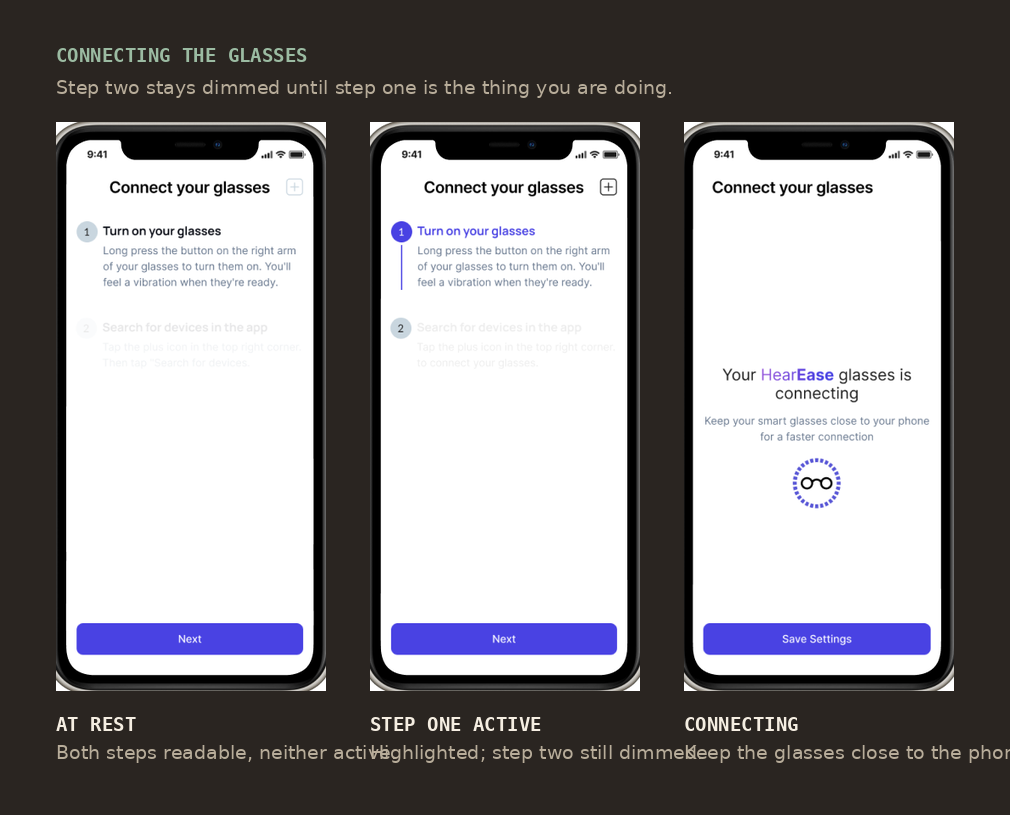
Hypothesis
Showing both steps while activating only one tells a user how long this will take without letting them get ahead of it. A second testing round ran on the revised design; its results are not in the project file, so whether this worked is not something I can claim.
Asking for a microphone, honestly
A product that listens all day has to explain itself before it starts.
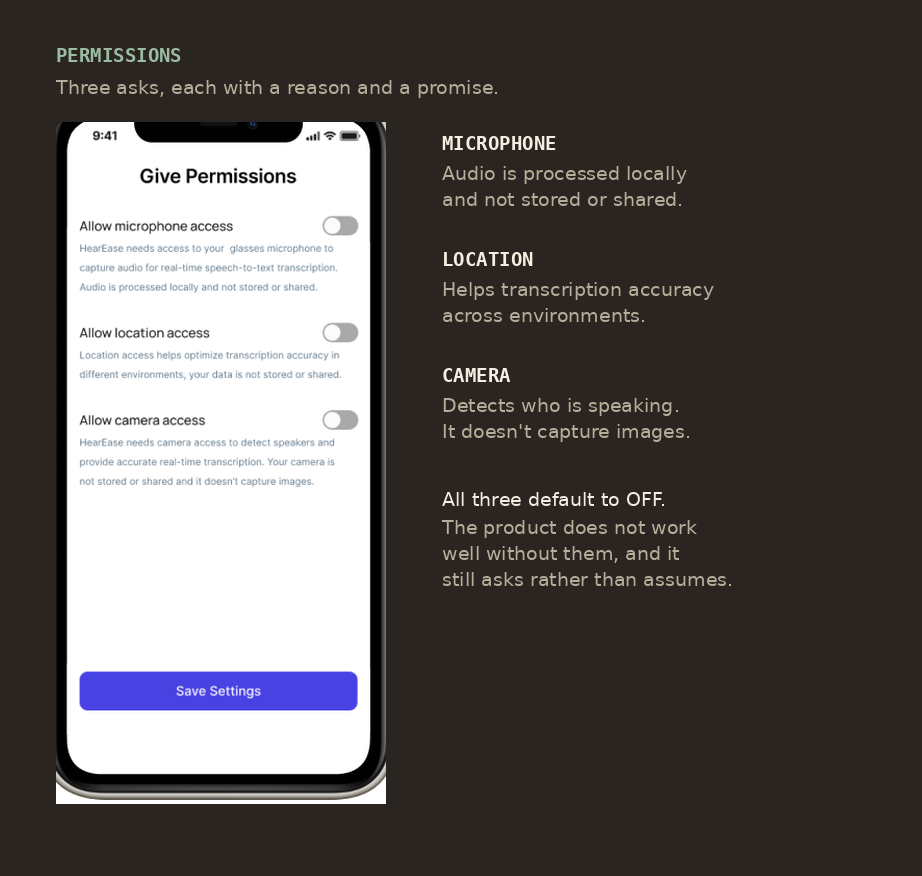
Interpreted
A user of this product is choosing between handing over a microphone, a camera and their location, and going back to missing half of their meetings. That is not a free choice, and it makes the usual permission conventions (vague purposes, a policy link, defaults already on) worse here than elsewhere.
What I took from it
Test the setup first. We tested it because it happened to be task one in a flow that ran front to back, and found the problem almost by accident. Had we gone looking for the least interesting screen deliberately, we would have found it weeks earlier.
And saying what happens to the audio, in the sentence that asks for the audio, costs nothing. It is the one piece of this project I would carry into any product.
Scope, ethics and limits
What this is
- A design project about communication access, grounded in interviews with hard-of-hearing people and with experts.
- A three-person team project. Everything described as "we" was done together.
What this is not
- Not a medical or hearing-care device, and not a substitute for one.
- Not an engineering claim. No glasses were built; whether real-time accent-adaptive transcription performs as the concept assumes is untested and outside what design can answer.
- Not a solo project, and not a claim to have run the research alone.
What is still unvalidated
- The core premise: that accent-adaptive transcription is accurate enough to follow a live meeting. The design assumes it.
- Whether the revised calibration flow actually fixed the problem. A second testing round was run on the revised design; the file does not record its results, so no improvement is claimed here.
- Everything about wearing the glasses. All testing was on the app; the AR display and the physical product were never tested on a face.
Who is not represented
- Deaf people who do not use speech: the project is framed around hard-of-hearing people in hearing workplaces, which is a narrower group than it may appear.
- The file does not record how many people took part in usability testing, so no participant count is given.